Paths, particles and backgrounds
Add a Path preset or draw with the pen, then trim it to animate it drawing on. Add Particles such as confetti or sparkles, import SVG or Lottie, and give scenes animated gradient, noise and film-grain backgrounds.
Paths and the pen tool
- Presets: Arrow, Curved arrow, Underline, Squiggle, Circle scribble, Check mark, Star, Heart, Line and Blob.
- Draw with the pen: click to add points and drag to curve. Click the first point to close the shape; Enter finishes and Esc cancels.
- Edit points: drag anchors, double-click to switch between corner and smooth, and hold Option to move one handle.
- Stroke Width, caps, Dashed, and arrows at the start or end.
- Combine two or more paths with Union, Subtract, Intersect or Exclude.
Draw on and morph
Under Trim, set Start, End and Offset. Draw on keyframes the path drawing itself over one second from the playhead. To morph between shapes, keyframe Shape at two different times.
Particles
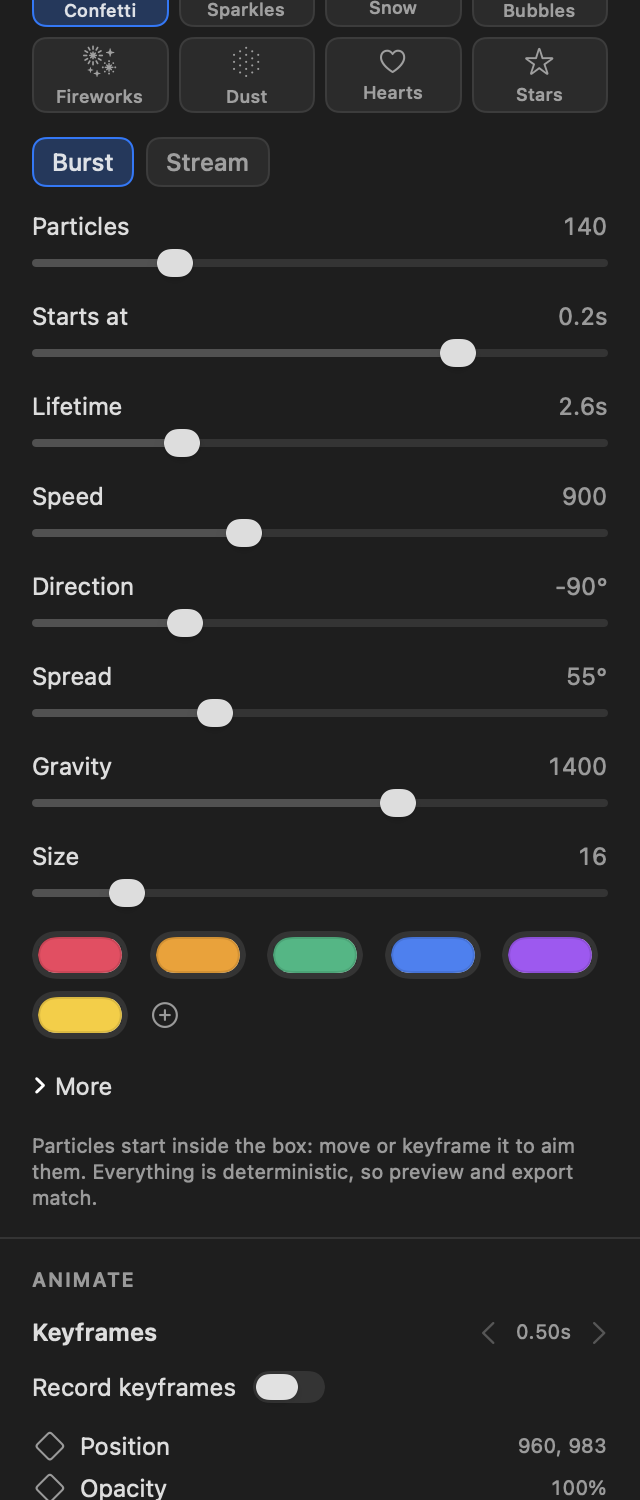
| Setting | Options |
|---|---|
| Presets | Confetti, Sparkles, Snow, Bubbles, Fireworks, Dust, Hearts, Stars |
| Burst | Up to 600 particles at once |
| Stream | Up to 150 particles per second, for a set time |
| Physics | Starts at, Lifetime, Speed, Direction, Spread, Gravity and Size |
| More | Shape, air resistance, size variety, spin, flutter and fade out |
SVG and Lottie
Insert → SVG or Lottie… imports .svg files as editable vector art, and .json or .lottie animations that play like video, with speed, looping and time remap.
Animated backgrounds
In a scene's Background, choose animated gradient blobs (colors drifting over a base color) or flowing noise, and set their Speed. Grain adds film grain to any background.
Related articles
- Animation and keyframesSelect an element and scroll to Animate. Start with an Entrance, Exit or Loop preset, add keyframes with the ◆ buttons or Record keyframes, and open Advanced for motion paths, expressions, sound reactions, parenting and effects.
- Scenes and elementsA Screen Agent video is a sequence of scenes: the recording scene and design scenes (slides). Add scenes with + in the scene strip, and add text, buttons, shapes, icons, images, videos, paths, particles, SVG or Lottie from Insert or the Add section.
Still stuck? In Screen Agent, choose Help → Send Feedback… and pick Question, or browse the help center.