Make your first video
Click New video (⌘N) on the home screen. Record a Website in Screen Agent's built-in browser, or your Full screen, an App or a Window. You can also start without recording, from Blank or a Template.
The New video window
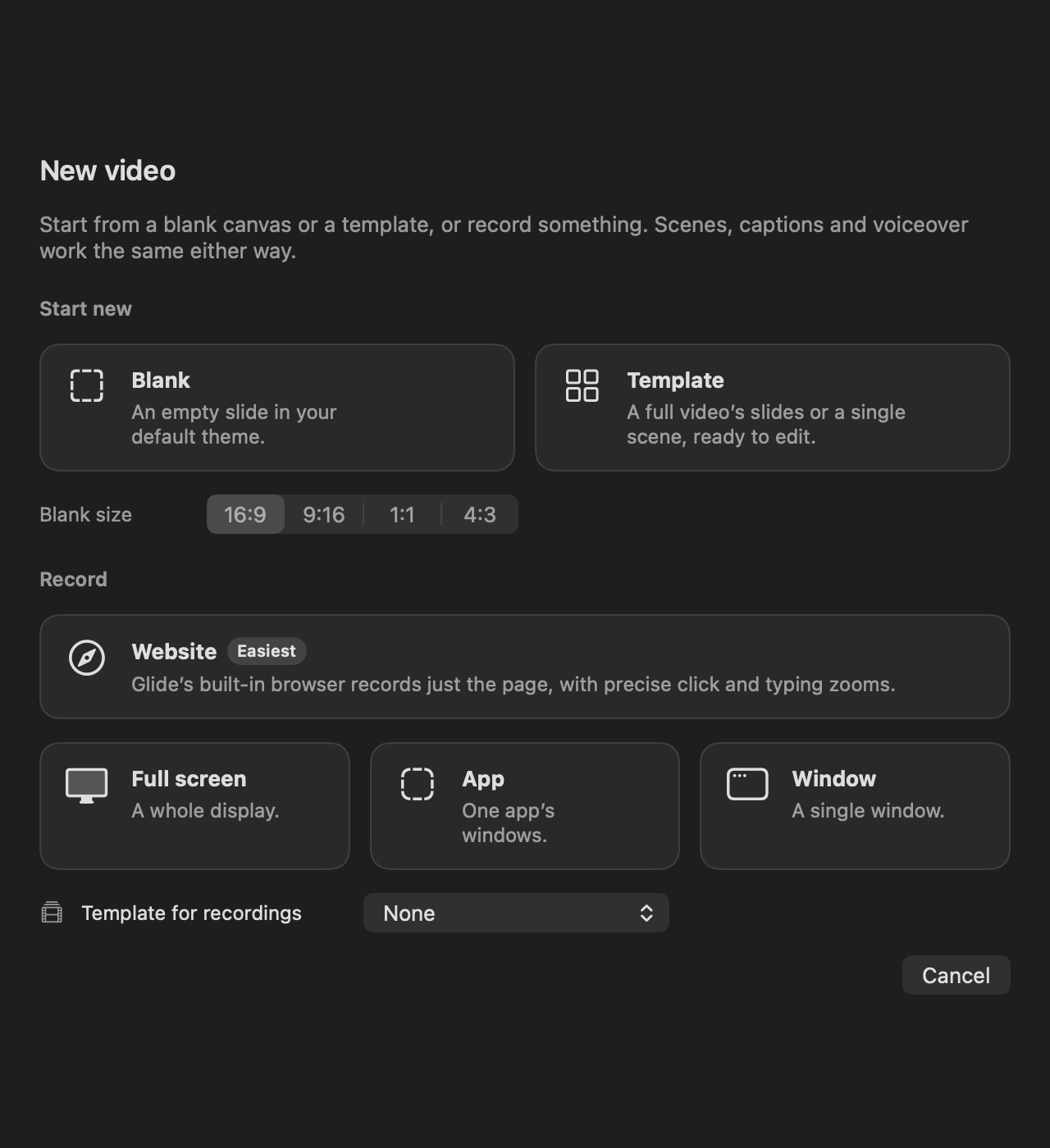
- Blank: an empty slide in your default theme, at the Blank size you choose (16:9, 9:16, 1:1 or 4:3).
- Template: a full video's slides or a single scene, ready to edit.
- Website (Easiest): Screen Agent's built-in browser records just the page, with precise click and typing zooms.
- Full screen, App or Window: record anything on your Mac.
Apply a template automatically
Pick a Template for recordings at the bottom of New video. When you stop recording, Screen Agent wraps the recording in that template's slides and style, and fills in the title and website from what you recorded.
A typical first video
- 1Click New video and choose Website.
- 2Enter your site's address, choose a size such as Desktop · 1440×900, and press Record (
⇧⌘R). - 3Click through your flow, then press Record again to stop. The editor opens with zooms already added.
- 4Trim the start and end, and add a title scene, a template or a voiceover.
- 5Press Export (
⌘E) and pick a preset such as Web or Social.
Your videos
The home screen lists every video with its length, source and date; videos started without recording show Slides. Use Search videos to find one, and right-click a video to Open, Rename…, Duplicate, Translate…, Show in Finder or Delete….
~/Movies/Glide. Deleted videos go to the Trash.Related articles
- Record a websiteChoose New video → Website, enter an address, pick a viewport size and press Record (⇧⌘R). Screen Agent captures only the page at Retina resolution and 60 fps, and zooms precisely on every click and keystroke.
- Record your screen, an app or a windowPress Record Screen (⇧⌘S), choose Full screen, App or Window, pick a source and click Start recording. Stop from the control bar at the top of the screen, or press ⌃⌥⌘R in any app.
- TemplatesOpen Insert → Scene templates… or Video templates…, type your words, pick a theme and click Add scene or Use template…. A video template adds intro and outro slides and restyles the video, while keeping your recording, cuts, zooms and audio.
Still stuck? In Screen Agent, choose Help → Send Feedback… and pick Question, or browse the help center.