App language and feedback
Screen Agent follows your Mac's language. To change it, open Settings → General → Language and click Restart now. To report a problem or ask a question, choose Help → Send Feedback….
Change the app language
- 1Open Screen Agent → Settings… (
⌘,) and choose General. - 2Pick a Language: Same as macOS, English, Deutsch, Français, Español, Italiano, Português, Nederlands or Polski.
- 3Click Restart now.
NoteA few error and status messages are still in English.
Send feedback
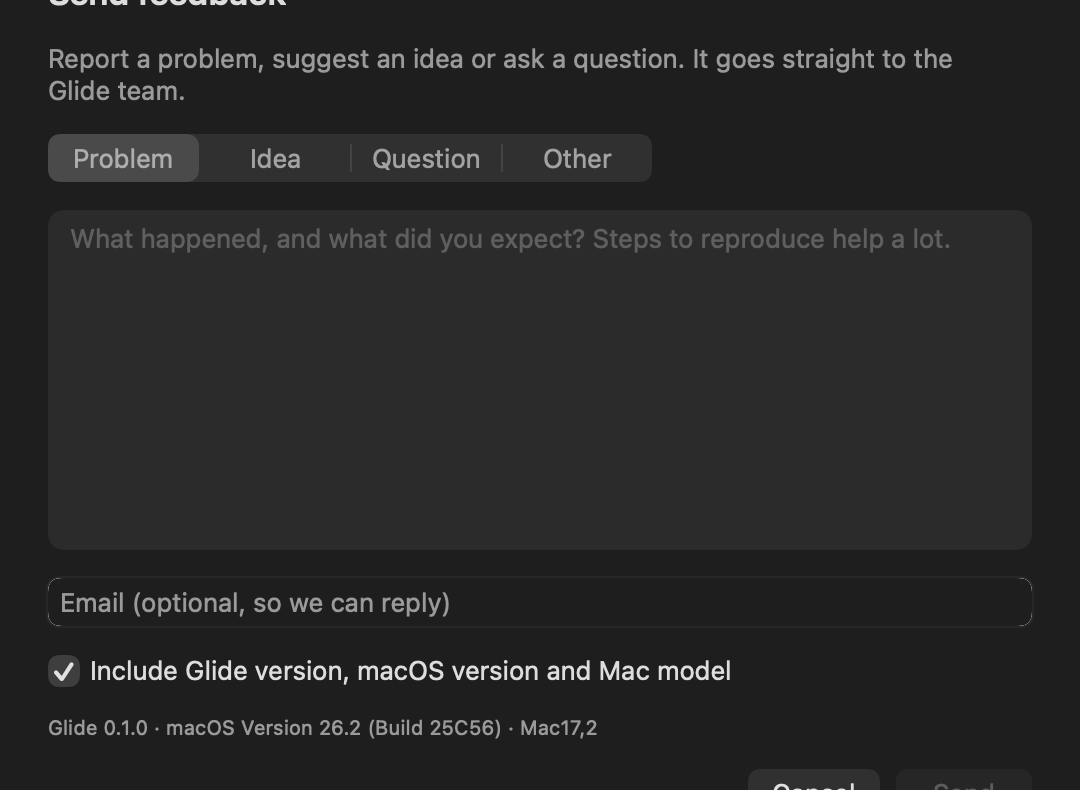
- 1Choose Help → Send Feedback…, or click Feedback on the home screen.
- 2Pick Problem, Idea, Question or Other, and write your message.
- 3Add your email if you'd like a reply. Keep Include Screen Agent version, macOS version and Mac model on to help us reproduce issues.
- 4Click Send (
⌘↩).
Acknowledgements
Open-source licenses are listed in Help → Acknowledgements and in Settings → About.
Related articles
- License and updatesSettings → License shows who Screen Agent is licensed to, your key, seats, and how long it works offline. Deactivate this Mac… frees your key for another Mac. Your license includes every update within its major version.
- TroubleshootingMost problems come from a missing macOS permission, a missing API key, or Screen Agent not being activated. Find your symptom below.
Still stuck? In Screen Agent, choose Help → Send Feedback… and pick Question, or browse the help center.